

Convert a Whole Folder of Images in One Drop
FlipConvert converts HEIC, WebP, PNG, JPG and more, a whole batch at a time, plus lossless video trim, remux and audio extraction. Nothing uploaded.

- $8.99 one-time
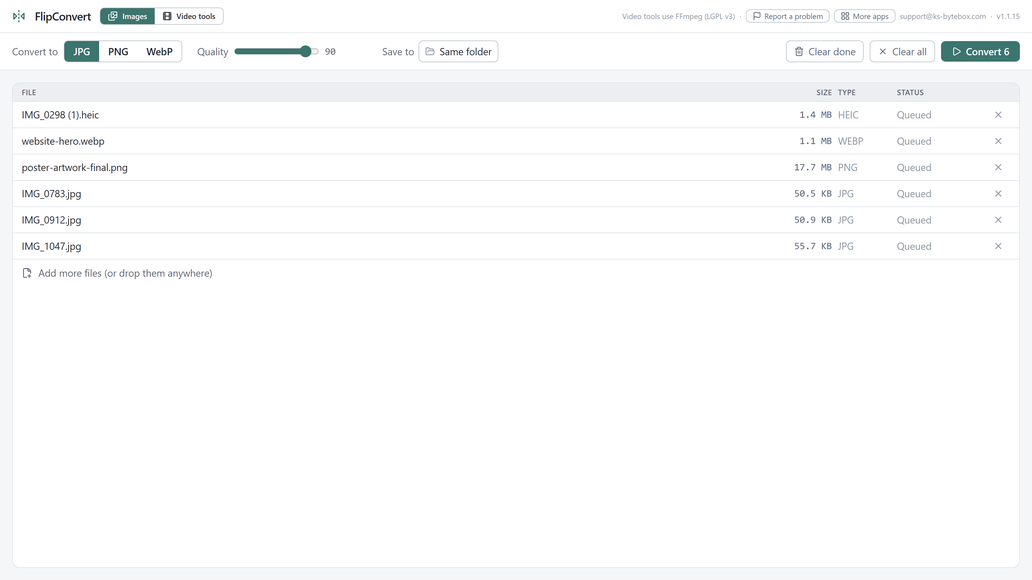
What it does
- Convert HEIC, WebP, PNG, JPG, BMP, TIFF, GIF to JPG, PNG, or WebP
- Batch image conversion in parallel across all CPU cores
- Quality slider for JPG and WebP output (100 = lossless WebP)
- Never overwrites: numbered copies, originals untouched
- Lossless video trim, remux, and audio extraction: no re-encoding, no quality loss
- Drag and drop anywhere, or click to browse
Good to know
- HEIC conversion uses the Windows HEIF Image Extensions, a free Microsoft add-on preinstalled on most modern PCs; FlipConvert tells you if it is missing.
Frequently asked questions
Can I convert a whole folder at once?
Yes, drop in a batch of files or a whole folder and FlipConvert converts everything in parallel across your CPU cores.
Will it overwrite my original files?
No. Converted copies are written next to the originals or to a folder you choose, and existing files are never overwritten; a numbered copy is created instead.
Does HEIC conversion need anything extra installed?
It uses the Windows HEIF Image Extensions, a free Microsoft add-on preinstalled on most modern PCs; FlipConvert tells you if it is missing.
Can it edit video too?
Yes, lossless trim, remux to a different container, and audio extraction, all as stream-copy operations with no quality loss and no re-encoding wait.
Is there a file size limit?
No.
Your files stay yours
All 11 KS-ByteBox apps run entirely on your PC. They have no accounts and no tracking, and your files never leave your machine. Purchases and licensing are handled by the Microsoft Store.